Popular Pranks


Contribute
Prank Sites




Useful Tools



Misc




 Flasher - Free Computer Prank Software
 Download Now
-
Download Now
-  Contribute to keep Flasher free
Description
Flasher is a hidden prank program that allows you to flash any image to the computer screen, almost like a subliminal message! Flasher supports JPG, BMP, EMF, WMF and ICO formats. All you have to do is specify the image you want to flash and the amount of time between flashes. When the software is not flashing the image to the screen, it hides itself within Windows until the next time it needs to flash.
This is a great prank to play on your friends. Imagine flashing the logo of the opposing sports team or a photo of their ex. The possibilities are endless so download Flasher today -- it's free.
Fully Portable
-
 No Installation Required - Runs directly from an
.exefile or folder. -
 Self-Contained - Stores settings, configurations, and dependencies in its own folder.
-
 No Registry Modifications - Doesn't change system settings or install drivers.
-
 Portable Storage - Can be copied to a USB drive and used on multiple computers.
-
 No Admin Rights Needed - Runs under standard user accounts. No UAC prompts, no IT ticket required.
-
 Leaves No Trace - Doesn't leave behind files or registry entries after use.
Screen shots
Click on an image for more detail
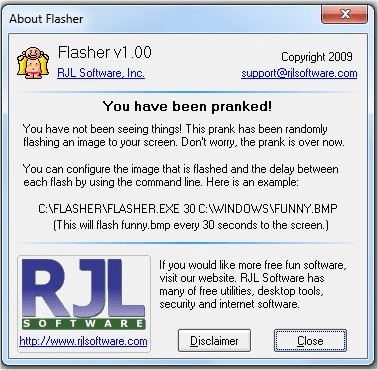
Command line Options
There is NO user interface to this application. By default, if you do not specify a command line, the RJL Software logo will flash. You can specify your own image and time to flash by using the following command line.
flasher.exe [seconds to delay] [path to image file]
For example:
"C:\MY STUFF\FLASHER.EXE" 60 "C:\WINDOWS\DESKTOP\UGLY.JPG"
This would flash the "ugly.jpg" file to the screen every 60 seconds.
Not sure what a command line is or how to use it? Read our detailed explanation here.
How to close
Move your mouse pointer to the TOP LEFT corner of your screen. This will stop the program from running in memory. If you have successfully moved your mouse in the correct position, the program will close and display an About Box Screen. Once you close this screen, the program will exit. Exiting the software will allow Windows to delete the file.
Download Flasher
 Was the download blocked by your browser? Read this

120 downloads today
Verified Safe
SHA-256: 6206962f067360568d2052e410b688486d460ff13f7dc02c2207fb5043d34bf4
Last scanned: 7/27/2026 at 2:27 AM
Something not working? Report a problem
Windows Support
Flasher is supported and tested run flawlessly on these Windows Operatings Systems:
Win11Win10Win8Win72008VistaWinXP20032000WinNTWinMEWin98Win95
 X
X Facebook
 Reddit

